
TVG and FanDuel Racing searches can lead to an app, a television program or a replay archive. Start by identifying which one you need, then match the track, racing date and race number. This guide explains the different products, the 2026 television announcement and a practical way to find and review a race without confusing viewing access with wagering eligibility.
Start with the product you are trying to use
TVG, FanDuel Racing and FanDuel TV appear together in racing searches, but the name alone does not tell you whether you have found a wagering account, a television channel or a streaming service. Begin with the task: finding a race, watching a program, checking a result or reviewing your own wager. Then choose the service that answers that task.
TVG’s official television-branding information distinguishes the television relaunch from wagering through the TVG app and website. This helps explain why an older TVG reference can still lead to a racing account rather than an obsolete channel name. Do not assume every product carrying the newer FanDuel name has replaced every older account in the same way.
Racing accounts and television coverage have different jobs
A racing account connects the customer with available races and wagering functions under its terms. Television coverage gives viewers a scheduled program, which may move between tracks and include commentary. A streaming catalogue supplies another route to listed content. These experiences can overlap on a screen without becoming the same product.
For example, you might want a continuous view of one course’s next race while a television program is discussing a feature elsewhere. Finding the TV channel does not yet identify the correct track feed. Equally, a race listed in a wagering app does not tell you that the whole television program is included on every device or subscription.
Write down the full product name before following help instructions. A guide for television access may discuss a provider subscription; an account guide may discuss identity and state eligibility. If the instructions answer the wrong question, they can leave you changing passwords or buying access that does not solve the original problem. Product identification comes before troubleshooting.
Read the 2026 television announcement without confusing it with the racing app
There is a significant reason to check the date on television advice. In its May 6, 2026 earnings release, Flutter said it planned to close the FanDuel TV racing network and FanDuel Picks product in 2026. The network is explicitly named. That statement does not announce the closure of the entire US horse-racing wagering business.
The distinction affects an ordinary race-day decision. Someone searching for TVG may be asking whether a television package will show the next race; someone else may be asking whether an existing racing account can accept a wager. A headline about the network cannot answer the second question by itself. Equally, finding a racing app in a store does not establish that an old television schedule remains valid.
The release does not give a precise final broadcast day in that passage. An announced closure year is also different from confirmation that a particular channel has already gone off air. Avoid turning either uncertainty into a definite claim about today’s feed. Check the provider’s current listing and the race organizer’s viewing information for the date you actually want.
Older articles can describe a different proposed timetable. Treat a later statement from the company as the better evidence for its announced plan, while still checking what viewers can access now. A search result displaying a familiar channel logo is weak evidence for a purchase: it may lead to a historical description rather than a current program.
Before adding a television subscription, identify the specific race or program you want and confirm that it is included. Our horse racing TV schedule helps locate published programs. Read the viewing conditions at the destination, especially during a change in services. A planned network change should prompt a better check, rather than a guess about every product sharing the brand.
Choose the correct racing app and check your access
Find the operator’s own app link, then compare the product name and publisher with the store entry. The TVG Apple listing names ODS Technologies, L.P. as seller. Its information section lists iOS 17.0 or later for iPhone and iPadOS 17.0 or later for iPad when checked on October 11, 2026. That is a useful device check, rather than evidence that every television or older tablet can run the same app.
Read the current compatibility section before troubleshooting a failed installation. Instructions written for an earlier version may describe a device that no longer meets the requirements. A streaming television app and a racing wagering app may also have different supported devices. One working on a phone does not prove that the other should appear in your television’s app catalogue.
A free download does not settle viewing or wagering eligibility
The store lists the download as free, but that price does not supply a wagering stake or waive account restrictions. The FanDuel Racing terms linked by its privacy policy require wagering customers to be at least 21, meet its citizenship or residency conditions, live in a state where its service is available and satisfy its self-exclusion restrictions. Apple’s separate 18+ content rating is not permission for an 18-year-old to open that wagering account.
The operator also requires accurate account information. Its privacy policy explains that wagering requires location information to be enabled. Device installation, identity verification and permitted wagering access are distinct checks. A location message is not necessarily a broken video player; a video problem does not necessarily indicate that a wager was refused.
If you only want to watch, establish the viewing conditions for that particular feed before funding an account. Do not deposit money merely to test an assumption that every video is included. Decide whether you need a track feed, a television program or an archived replay, and follow the applicable viewing instructions. That avoids treating a download button as a guarantee of access to everything carrying the TVG name.
Find a race by track, date and number
Use three identifiers together: the track, its local racing date and the race number. “Race 4” is incomplete because several courses may be approaching their fourth race at different times. “Del Mar” is incomplete because the same course has many racing dates. A major race name adds useful context, but the daily card gives you the precise event to find.
TVG’s public navigation separates racing schedules, results, track information and replays. Choose the destination that matches the stage of the race. To plan what comes next, begin with the today schedule; to revisit a completed event, carry the same identifiers into results or replays. A recent result is not a substitute for the next race’s card.
Compare the card with the video you have opened
Before relying on a stream, match its track and race number with the card. Check the date too, especially on an archive page. If your hypothetical target is Del Mar Race 4 on Saturday, a recording of Del Mar Race 4 on Friday can look convincing until you compare the runners. A broadcast moving between tracks may also show a different race while you are studying your selection.
Dates deserve the same care on entry pages. When checked on October 11, 2026, Del Mar’s entries page was pointing to November 6 and said entries were not yet available. An empty future card does not establish that an app has lost today’s field. Read the page’s heading before treating the absence as a service fault.
Changes can matter more than the first entry list
Check the dated changes alongside the original card. Del Mar’s September 7 changes, for example, listed Abel Lezcano replacing Joe Bravo on Angelica Bay in Race 3. That is an archived example of why the rider on your early copy can differ from the rider you see. It is not a change being reported for today.
Also separate a horse’s program number from its starting stall. DRF’s program guide explains that scratches and coupled entries can make these numbers differ. Follow the horse’s name and official program identifier; counting occupied gates can misidentify it. Establishing the right runner is essential before drawing conclusions about a replay, a result or an account transaction.
Separate the finish, official results and your account history
The first horse across the line, the official order and the settlement of your own ticket answer different questions. A video can show what happened on the course. The published result tells you the recognized placing. Your account record shows which wager you actually made and what happened to it. Check all three when something appears inconsistent.
An inquiry is one reason the initial finish can change. NYRA’s stewards’ explanation distinguishes the immediate decision about interference and placings from later film review concerning the rider. Do not mistake a subsequent disciplinary discussion for evidence that an earlier account payment must automatically be recalculated. Find the decision relevant to the official order of that race.
FanDuel Racing’s account terms say successful wager proceeds are credited once the race is official and host-track winning payouts are available. The conditions matter more than a countdown you invent from the moment the horses finish. A race ending on screen does not establish that the operator already has everything needed to settle it.
Next, compare the ticket details with the published result: track, date, race, wager type, selections and amount. A winning horse in the race does not establish a winning ticket if you selected a different event or wager. Our recent results can help locate the race, but your operator’s accepted wager record remains the place to investigate your own transaction.
Published payout tables also specify a wager base. Read that label before comparing a figure with the amount returned on a different stake. A displayed payout is not simply a forecast from the odds you saw earlier. If the account record is unclear, retain the wager identifier and ask the operator to explain that transaction; do not place another wager to see whether the first one was accepted. The account terms explain where customers should check accepted wagers.
Use replays to understand the race you actually watched
Once you have the right race, watch with a question rather than replaying the finish alone. Did the horse break cleanly? Was it able to settle behind the leaders? Did it have room to move when its rider asked? Those observations give a placing context. They do not require you to turn every defeat into an excuse or every clear winner into a future certainty.
Begin with the whole available race. Locate your runner near the start, follow it through the turns and watch the point where it is asked to advance. Then return to the passage that interests you. If you only joined the live feed approaching the finish, a replay may reveal the earlier part you missed; a short highlights clip may still omit it.
.jpg)
A replay and a live broadcast answer different questions
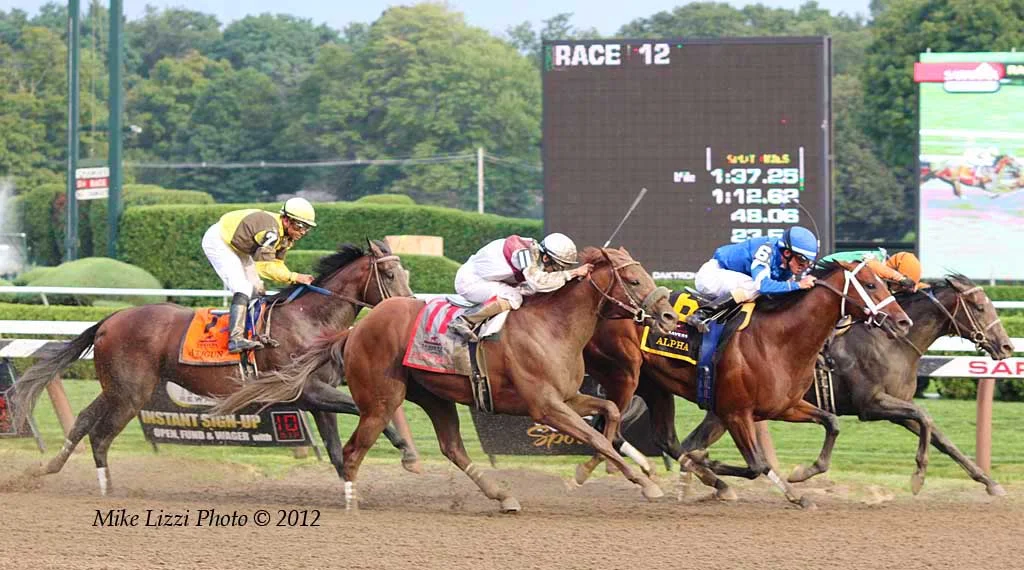
Live coverage helps you follow what is happening now. An archive helps you reconsider a completed event. NYRA’s Saratoga replay page explains that replays become available after results are official. Its date controls also matter: a page opened on a day without available replays is not a complete statement about every earlier race. Select the racing date before deciding the event cannot be found.
Read the chart alongside the film. Equibase’s chart glossary announcement explains its effort to make running comments easier to understand. The chartcaller’s description and your visual impression can help you ask a better question. A comment about trouble is a reason to inspect the relevant passage, rather than proof of how the horse would have finished without it.
Keep a short note that separates observation from interpretation. “Checked behind another runner entering the turn” describes what you believe you saw; “would certainly have won” adds a much stronger claim. Record the track, date and race number with the note so you can revisit the same footage. Used this way, replay study improves your understanding of a performance while preserving the difference between what happened and what might have happened.
When something is missing, identify the problem before changing services
An absent race, an unavailable video and a blocked account are different problems. Start by describing the one you have. If a card is missing, check the track and local date, then whether entries have been published. If the card is present but the video is not, check the feed’s viewing conditions. If the account displays a restriction, ask the operator about that message rather than assuming another television package will remove it.
Keep the comparison narrow. A track’s archived replay opening successfully does not show that its live feed must be available through your account. A television program playing does not show that wagering is enabled. Testing several unrelated services can make the situation more confusing because each result answers a different question.
For help, use the provider’s own destination, such as the TVG support centre. Prepare the product name, device, operating-system version, track, racing date, race number and the exact message you received. State whether the problem affected installation, sign-in, video or a particular transaction. Include the time you encountered it, with your time zone, so a support conversation is about the same incident.
Keep account credentials and sensitive identity details out of public comments. If an account needs further verification, follow the operator’s own secure instructions. Do not create extra accounts or repeat a deposit as a way of diagnosing a video problem. When a wager’s acceptance is uncertain, establish its recorded status before doing anything that could duplicate it.
For watching without a wager, the free viewing guide can help locate announced official opportunities, with their conditions. The track directory provides another starting point when you need the course’s own information. Carry the race’s identifiers with you whichever route you choose. That makes the search about the event you want to follow, rather than whichever brand name appears first.
Cover: Saratoga Race Course, July 10, 2009. Photo: Matt H. Wade / UpstateNYer, CC BY-SA 3.0; resized and WebP encoded under the same licence. Historical venue photograph.

Join the conversation
Have a question or a race-day tip to share? Keep it friendly and on topic. Comments appear after review.
No comments yet. Start the conversation.
Sign in with Google to leave a comment.