
A horse racing streaming app should help you follow a race, not leave you guessing about downloads, logins and video rights. Use this guide to compare official viewing routes and build a setup around the horses and cards you care about.
Choose an app around the race you want to follow
The useful question is not which horse racing app has the longest feature list. It is whether the app gets you to the horses you actually follow. A newcomer wanting to watch one Saturday feature, a fan keeping track of a promising maiden and a regular viewer following an entire card need different things from the same small screen.
Start with the course and race rather than an app-store ranking. Confirm the meeting, the local racing date and the individual race number through today’s racing schedule. Then decide whether you need a live feed, a reminder, a replay or an explanation of the field. That order makes coverage gaps much easier to spot: an app can be useful for entries while failing to provide the particular live video you want.
Live video, alerts and replays are different jobs
A live feed lets you follow the race as it is shown, potentially including the paddock and the journey to the start. An alert tells you to look; it is not the race itself. A replay lets you return to a performance after the event. These functions can sit beside each other, but one does not prove the others are available for the same course.
Horse Races Now’s developer description illustrates the distinction, advertising entries, favorites and notifications alongside video from participating tracks. The qualification about participating tracks matters more than a broad promise of racing wherever you go. Treat the feature list as a starting point for checking your selected course, rather than a guarantee that every race is included. Read the official store description.
Imagine following a young horse while you are at work. An entry reminder helps you learn that it is due to run on Friday; an earlier calendar reminder gives you time to check the card; a replay helps you review its performance that evening. A notification as the field reaches the gate may be too late to open an app, resolve a login and find the right player. More notifications are not automatically a better way to follow the sport.
For a major race, you may instead prefer a presenter explaining the contenders and interviewing connections. That is a broadcast choice, even when the programme arrives through a phone app. For a full afternoon at one course, continuity matters more: confirm whether the player stays with that card or switches to races elsewhere.
Keep your viewing purpose separate from wagering. An app’s betting button does not make betting necessary to enjoy a performance. If a service requires a racing account for video, assess that access condition before registering; if you only need the published outcome, the results tool may answer your immediate question without any new installation.
What the main kinds of racing app actually offer
A useful comparison groups apps by the experience they provide. A horse tracker, a course companion, a broadcaster and a racing-account service can all display video, but they organize your day differently. Their published descriptions help you narrow the choice; they do not replace checking your own race and access conditions.
Horse Races Now: following horses and participating tracks
Horse Races Now’s official iOS and Android listings describe favorites for horses, tracks, trainers and jockeys, with entries, notifications and replay functions. They specify participating North American tracks for video. That makes the app worth considering for someone following a horse across starts, while leaving a practical question: is its next course part of the available coverage? Check the Android developer listing.
Do not confuse having a horse in a favorites list with possessing video rights to every race it enters. A tracker can tell you about a runner even when your chosen viewing route is elsewhere. Use the horse’s entry to identify the next race, then establish where that card can be watched. Treat older customer reviews as individual experiences rather than a current measurement of playback quality.
A racecourse app can be enough for one meeting
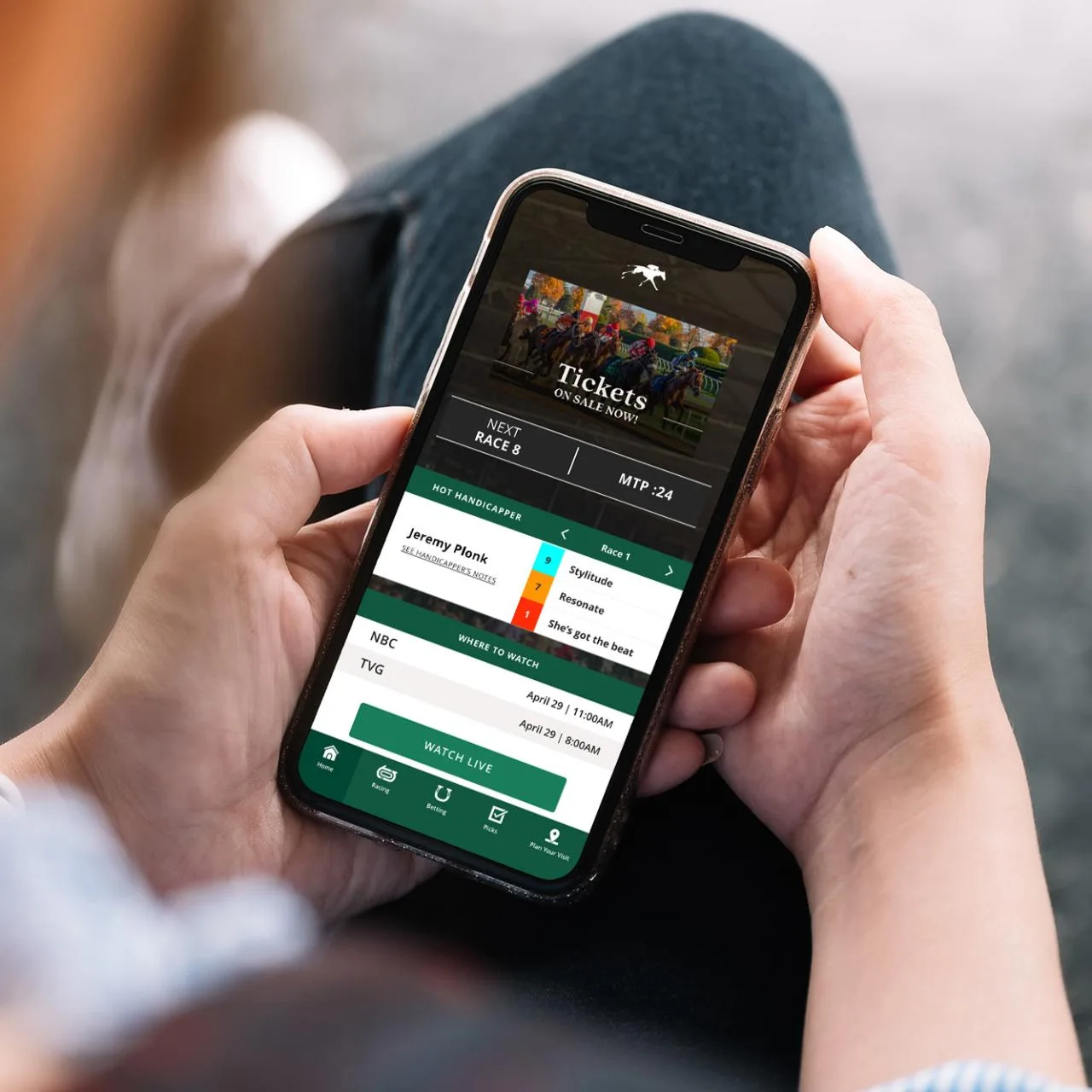
If you mainly follow one course, its own app may provide a more focused experience. Keeneland describes its Race Day app as a place for upcoming race information, entries, live viewing, replays and course information. The official page also distinguishes its bet simulator from the act of placing a wager. Watching, planning and wagering are separate functions even inside a racing-focused product. Explore Keeneland’s app features.
A course companion can be especially useful when the same reader follows races at home and visits the grounds during a meeting. Race information and visitor information serve different parts of that day. The limitation is equally clear: a tool built around Keeneland should not be mistaken for a complete video service for every American course. For another meeting, begin again with that course’s official viewing information.
Broadcaster apps and racing accounts have different conditions
Racing TV’s app centre describes phone, tablet and large-screen options and distinguishes member race coverage from free features. Its focus includes British and Irish racing, so its existence is not evidence that the American card you want is carried. TwinSpires, by contrast, advertises live racing video with registration through its racing service. Confirm the selected card and access condition rather than transferring one provider’s offer to another. See Racing TV’s app information and TwinSpires’ video description.
Old app names require particular care. NYRA says its NYRA Now app was discontinued on July 6, 2026 and points viewers to current YouTube and television coverage. Separately, Flutter’s May 6, 2026 release announced a plan to close the FanDuel TV racing network in 2026; that statement does not establish closure of all racing-account services or a specific final broadcast day. Check the current NYRA notice and Flutter’s dated announcement before following an old download guide.
Check the cost and coverage before you download
Separate the price of installing an app from the conditions for using it. The download button is the beginning of the comparison. The decisive information is whether you can watch your chosen race, what you must do to gain access and whether any continuing payment is involved.
A free installation does not settle video access
Horse Races Now’s Apple listing says the app is free with in-app purchases, and its version history includes a requirement to log in for race data. Those details make “free app” an incomplete answer to a viewing question. They do not by themselves establish which video will play for a particular user or which extra product that user might want. Check the current store information.
Racing TV supplies another useful distinction: its app page separates free final-furlong replay features from complete member live coverage. A short clip, a news article and an entire live race are different products. An app may provide some of them without a subscription while charging for others. Read the broadcaster’s feature conditions.
Before paying, answer four questions in plain language. Is the app itself free to install? Is an account needed? Is the live video included in the account you intend to use? Does the price also cover the device and replay access you want? If a trial or promotion appears, read the renewal and cancellation terms for that offer rather than assuming it continues indefinitely.
Do not pay for data you do not need merely because it sits next to a player. A casual viewer following a feature race may want commentary and pictures; a regular student of form may value fuller race information. Decide what you will actually use before comparing packages. A viewing guide cannot supply a permanent price for products whose offers change.
Country, course and account restrictions matter
A provider’s geographic audience matters as much as its app-store availability. Racing TV’s published subscription terms refer to private viewing in the United Kingdom and Republic of Ireland. That is a reason for a US reader to check the applicable service terms and coverage rather than treating a British racing app as a universal American viewing solution. Read the relevant subscription terms for your chosen product.
Then narrow the question from country to course. A broad racing service can include many meetings without carrying the one you follow. Look for the track you want and the racing date, not merely a national flag or a claim about hundreds of courses. The same applies to replays: coverage of a current card does not establish that every older performance you want remains available.
For account-based racing video, check the operator’s current requirements for your location and account. Viewing and wagering conditions should not be guessed from another user’s experience. If your objective is simply to watch, compare the course’s official alternatives and the free viewing tool before opening an additional account. The useful outcome is an appropriate route to the race, rather than collecting downloads that all lead back to another signup screen.
Make the viewing setup work on your actual device
Choose the screen you plan to use before choosing a subscription. A phone is convenient for checking a runner, but a full afternoon is a different viewing task. On a larger screen, it is easier to follow the field around a turn and keep the race number visible. That preference does not mean a phone app automatically has a television version or supports every way of sending video to another screen.
Check the official store’s compatibility entry for your device. For example, the Horse Races Now Apple listing currently requires iOS 16 or later. Read the listing for the actual platform you own rather than assuming an Android version has identical requirements or menus. Follow download links from the provider’s official website or recognized store so that the name, developer and product match.
For television viewing, look for instructions naming your streaming device or TV system. RTN’s homepage provides instructions for Roku and Fire TV. Those named options are useful evidence; an unsupported television brand should not be added to the list merely because it also has an app store. Use the provider’s device instructions to establish what is supported.
Make a short trial run before the card you care about. Open an available official replay, check that it is the selected course and date, listen to the audio and see whether the picture stays stable. This is a useful test of your own setup, not a guarantee that a future live event will be carried. If your subscription requires a separate sign-in on the television, complete that process well before the target race.
If an official YouTube feed is your route, Google recommends checking the internet connection, reducing video quality where needed and keeping the app or browser current when playback fails. For missing sound, check the device and browser volume. These are ordinary troubleshooting steps, rather than evidence that the race has been cancelled or that another betting account is needed. Read the official playback guidance.
When a player shows an access message, read the message before changing the setup. A subscription, login or regional restriction is a different problem from a weak connection. If the page says the event has not started, return to its stated date and time. Repeatedly reinstalling an app cannot make a race start earlier or add a track absent from its coverage.
Keep a browser bookmark for the organizer’s current viewing page as a backup to the app. If an update changes the menus or a device stops cooperating, that bookmark takes you back to the published alternatives. The objective is a dependable route to the horses you follow, with enough preparation that your first attempt does not happen as the field enters the gate.
Use an app to follow a race from entry to result
The strongest reason to keep a racing app is that it helps you follow a horse over time. Watching a single finish is enjoyable; connecting the entry, race conditions, performance and next start gives you something to follow beyond one afternoon. Use the app as a companion to that story, rather than treating every alert as an instruction to make a selection.
Build a useful reminder instead of relying on a last-second alert
When a favorite horse appears in the entries, record the course, racing date and race number. Read the announced conditions so that you know what kind of test it faces. Is the next start on the same surface and at a similar distance, or is it a different assignment? The answer gives you a viewing question before the field reaches the paddock.
Set a reminder early enough to check the official viewing route and any late changes. You can use your own calendar if the app does not provide the reminder you need. The course’s local date matters, particularly if you follow a card from another time zone. An evening race in one location may fall on the following calendar day for you; preserve the original course date when finding its result later.
Before the start, check whether the horse is still in the field. Keeneland’s official changes page illustrates the kind of information to look for: scratches and rider changes are listed against the relevant race. A favorites notification based on an earlier entry is a reason to check, rather than confirmation that nothing has changed. Use the course’s published changes where available.
Once the pictures are open, confirm the name of the track and the race number. If you move between cards, perform that check again. The same saddlecloth number and a similar-looking starting gate can appear at several courses; a reminder is useful only when it brings you to the correct field.
Keep the replay and official result together
After the race, save a way back to the performance rather than relying on memory of the winner. A replay lets you ask a focused question: did the horse get the position you expected, when did it make its move, and was its run uninterrupted? These questions help you describe the trip without inventing an excuse for every defeat.
Pair those pictures with the official chart. Equibase explains that its full charts include race conditions, fractional times and detailed footnotes as well as placings and payoffs. Those records provide context that a short finish clip cannot supply. Video access has its own subscription conditions, so a chart link should not be mistaken for an unrestricted replay. Read the official chart explanation.
Use completed race results to return to the right date and individual race. Separate the camera’s finish-line impression from the published official placing when an inquiry or objection is involved. If you take notes, label observations as observations: “I want to review the turn” is more honest and useful than claiming the horse certainly would have won.
A small collection of relevant reminders, an appropriate viewing route and clear links back to official outcomes can serve a fan better than several overlapping apps. Keep the tools that answer your own questions about the horses, and reassess them when coverage or your interests change.
Join the conversation
Have a question or a race-day tip to share? Keep it friendly and on topic. Comments appear after review.
No comments yet. Start the conversation.
Sign in with Google to leave a comment.